
07517 858103WhatsApp07517 858103WhatsApp
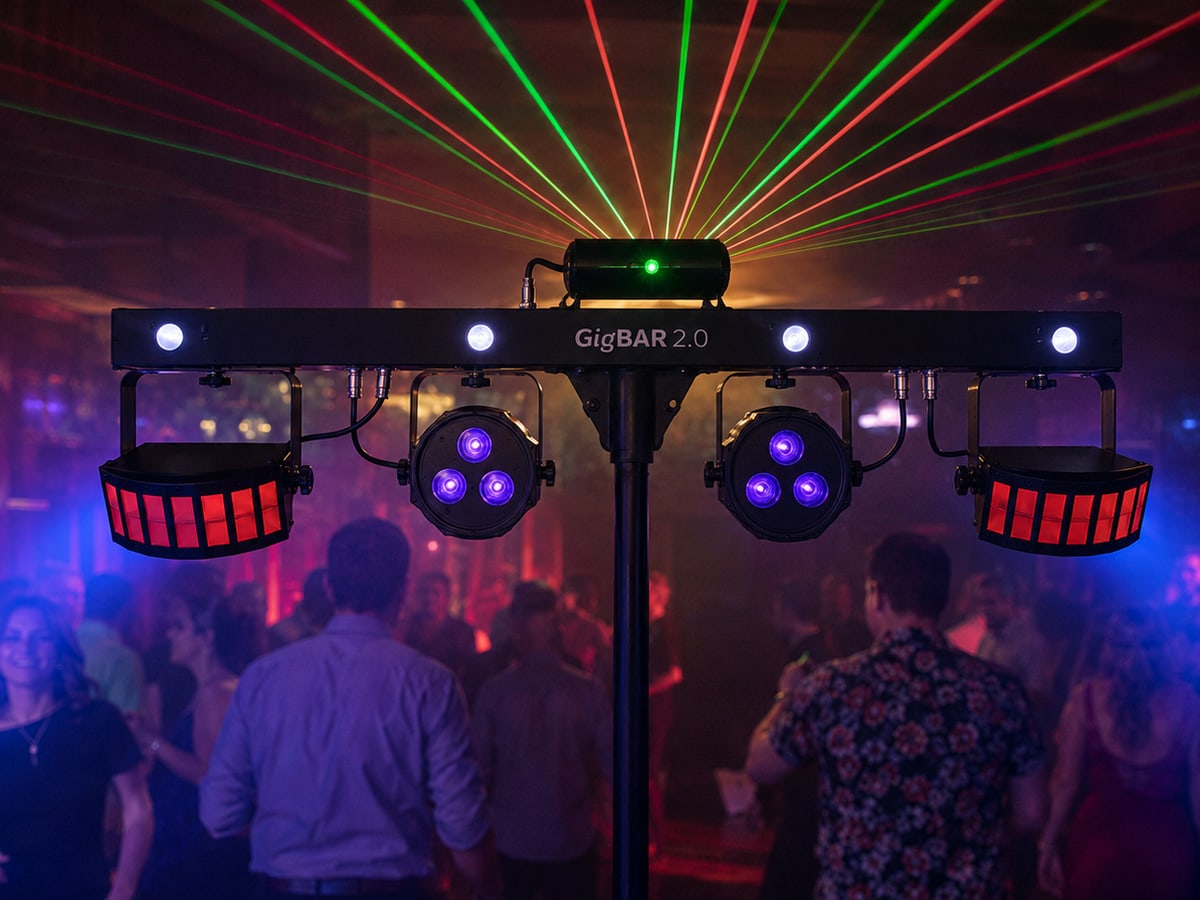
Chauvet DJ GigBAR 2.0 lighting package

Self-service setup guides

GigBAR 2.0 Lighting Package Setup Guide

A straightforward setup for an all-in-one party lighting bar with automatic and sound-to-light effects.

Reviewed by the Rent Loud team Updated 12 July 2026

Package checklist Step-by-step setup Safety and cable tips

At a glance

GigBAR 2.0 Lighting Package

£39/day

Best for

Parties and dance floors

Package focus

A compact party lighting setup with beams, wash effects, strobes, and sound-to-light programmes.

Before you begin

Choose safe positions, then check every item is there.

What's included

  • 1x Chauvet DJ GigBAR 2.0 LED Lighting System

Good setup position

  • Choose a dry, flat position beside or behind the dance floor—not in a doorway or walking route.
  • Keep the lighting bar well clear of drinks, curtains, decorations, and people.
  • Point effects into the dance area; never aim the laser at faces, traffic, aircraft, or reflective surfaces.
  • Make sure the stand legs can be fully opened.

Setup steps

Work through the setup in this order.

Step 1

Set up the stand

  1. Place the stand on flat, stable ground.
  2. Open its legs fully and tighten the leg adjustment knob.
  3. Set a modest height before mounting the lighting bar; do not overextend it.
  4. Keep enough clear space around the stand that guests cannot knock it.

Step 2

Mount the GigBAR

  1. With two people if needed, lift the GigBAR onto the stand.
  2. Secure its mounting hardware and check it cannot rotate or slide.
  3. Aim the wash and derby effects at the dance floor, not at doorways or seating.
  4. Keep laser output above head height where possible and never point it directly at people.

Step 3

Connect power

  1. Make sure the unit is switched off.
  2. Connect its power cable to the GigBAR and then to a suitable mains socket.
  3. Keep the cable along a wall or use tape/cable cover where it crosses a route.
  4. Turn the unit on only once it is mounted and aimed safely.

Step 4

Choose an automatic or sound-to-light programme

  1. Use the control panel or supplied footswitch to select an automatic programme for a hands-off light show.
  2. Choose sound-to-light mode if you want effects to react to music.
  3. Start with a slower programme, then test it with music before guests arrive.
  4. Use the footswitch to change programmes or blackout the effects when needed.

Step 5

Check and pack down

  1. Check the stand is stable and effects are not aimed at eyes, roads, or windows.
  2. Switch off and unplug before moving or dismantling the unit.
  3. Allow the unit to cool, remove it from the stand carefully, fold the stand, and pack every cable and controller.

Useful tips

Keep the setup clear, tidy, and under control.

Using sound-to-light
  • Place the GigBAR where its built-in microphone can hear the room music.
  • Use a normal music level for the most consistent response.
  • If effects are too busy, choose a slower automatic programme instead.
Laser and room safety
  • Never stare into, aim, or allow guests to aim the laser at people.
  • Do not aim laser effects out of a window or towards a road, sky, or aircraft.
  • Keep the unit dry and away from flammable decorations.

Troubleshooting

Quick checks if something is not working.

No lights
  • Check the mains socket, power cable, and on/off switch.
  • Check the unit is not in blackout mode on the footswitch or control panel.
Effects are not following music
  • Confirm sound-to-light mode is selected.
  • Move the unit closer to the music or increase music level slightly.
  • Try an automatic programme if the room is quiet.

Important safety notes

Keep the lighting stand stable and laser effects responsibly aimed.

  • Keep the unit dry and ventilated.
  • Never leave it where guests can knock it over.
  • Do not look into or aim the laser at people, vehicles, or aircraft.
  • Switch off before moving or connecting cables.
  • Do not open or repair the fixture.

Need help?

If you get stuck, contact Rent Loud.